
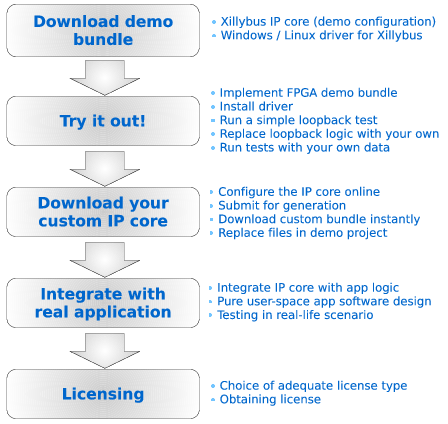
Start with the demo bundle...
Please choose one of the four:
- Xillybus for PCIe: Windows or Linux runs on a plain PC, FPGA contains the peripheral interface only. Data transport is PCI Express.
- XillyUSB, based upon USB 3.x: Like Xillybus for PCIe, but an USB 3.x cable connects between the Windows or Linux host and the FPGA, which behaves as a USB device.
- Xillinux for Zynq-7000: A full Linux distribution, including the Xillybus IP core and drivers, for running the a complete graphical desktop on the platform.
- Xillybus for Microblaze (phased out): Linux runs on a Microblaze processor on the FPGA, which also contains the peripheral interface. Data transport is the processor's AXI4 bus.
For the Xillyp2p IP core, please refer to its own start page.
... and then configure & download your own custom IP core
After getting the demo bundle up and running, and the principles are understood, go to the IP Core Factory and set up a Xillybus IP core according to your own needs.
The suggested general flow is depicted to the right.